Google's Desktop Android: Aluminium OS Leak Reveals Key Features and Early Design
Just hours before Google's anticipated Android Show: I/O Edition, a detailed leak has surfaced offering an unprecedented look at the company's upcoming desktop-oriented operating system, Aluminium OS. Leaker Mystic Leaks has shared a comprehensive package on Telegram, including screenshots and a 16-minute hands-on video that showcases the OS in its early stages. While Google is expected to reveal more at the event, this leak gives us a head start on understanding what Aluminium OS might offer.
Key Features of Aluminium OS
The leaked material reveals several distinctive features that set Aluminium OS apart from standard Android. These are clearly designed to optimize the experience for larger screens and desktop-like productivity.
Bottom App Dock
One of the most visible changes is a persistent bottom app dock, similar to those found on desktop operating systems like Windows or macOS. This dock holds frequently used applications and appears to be customizable, allowing users to pin their favorite tools for quick access. The dock remains visible even when apps are open, reinforcing a desktop paradigm.
Compact Side-Sliding Quick Settings
Aluminium OS reimagines the Quick Settings panel. Instead of the full-screen overlay seen on phones, the new version slides in from the side in a compact, narrow panel. This design conserves screen real estate while still providing quick access to toggles for Wi-Fi, Bluetooth, brightness, and other settings. It feels more natural on a wide monitor.
Virtual Desktops Integrated into Recents
Perhaps the most productivity-focused feature is the integration of virtual desktops directly into the Recents view. Users can create, switch, and manage multiple desktops without leaving the app overview. This allows for better organization of open windows—similar to virtual desktops on Windows or macOS—making multitasking far more efficient on a large screen.
Link to iOS App
Interestingly, the leak also shows a pre-installed “Link to iOS” app, indicating Google intends to improve cross-platform compatibility. This app likely enables file transfers, notifications sync, or other connectivity features between Aluminium OS devices and iPhones, mirroring functions of the existing Phone Link app for Windows.
Current State and Design Philosophy
Despite these promising features, the leaked version of Aluminium OS feels far from a polished desktop operating system. According to Mystic Leaks, the OS currently resembles “plain Android” but scaled up for larger screens. Many Google apps appear in a web-wrapped form—essentially web apps running inside a Chrome container—rather than being full native desktop applications. This is reminiscent of early Chrome OS or Android on tablets before app optimization became widespread.
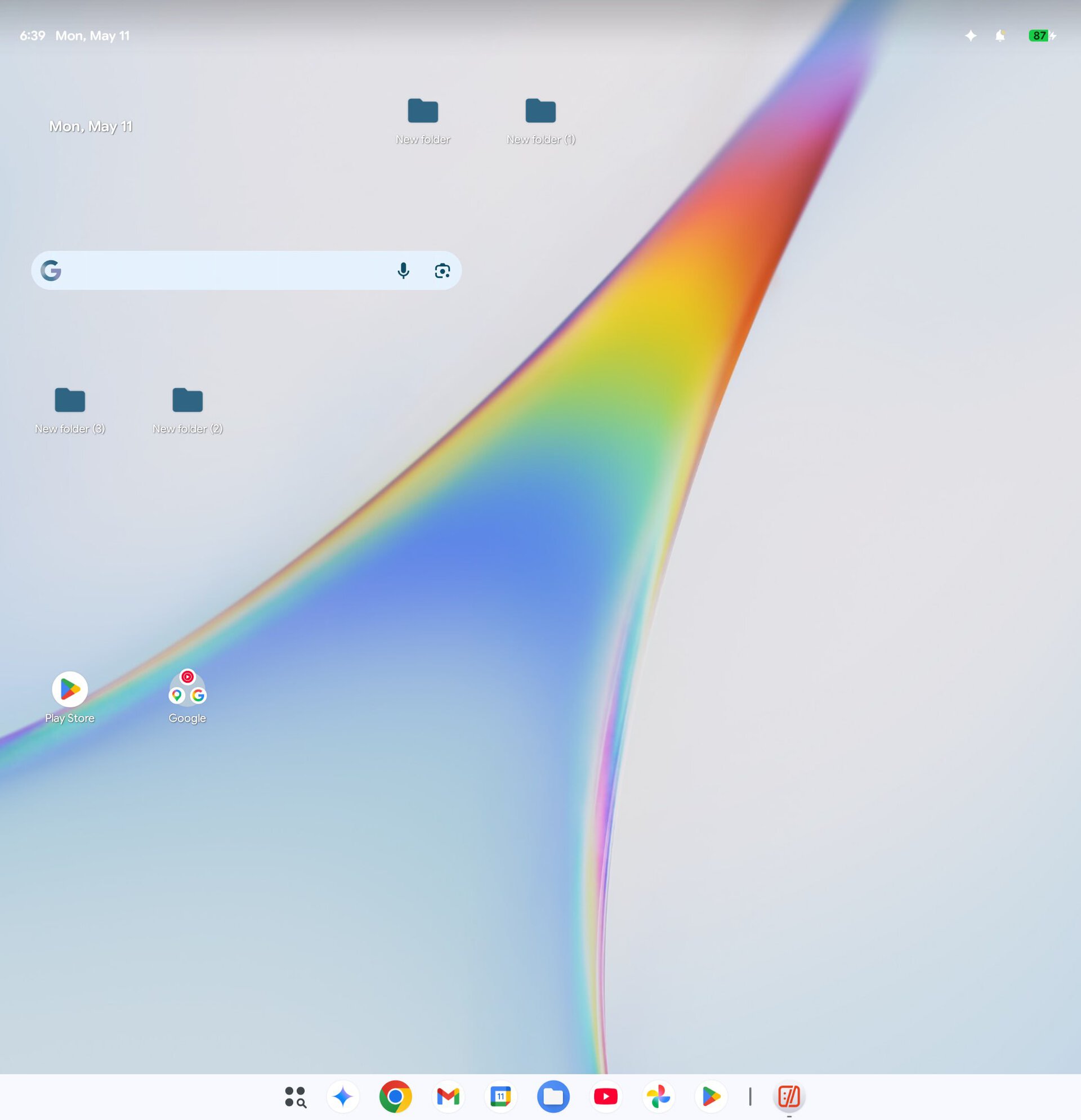
The user interface, while functional, lacks the refined desktop experience users might expect from mature operating systems. For example, there is no dedicated start menu or taskbar beyond the dock, and window management appears basic. The OS seems to prioritize familiarity for Android users over innovation, at least in this early build.
What This Means for Google's Desktop Plans
Google has long teased the idea of bringing Android to the desktop, and Aluminium OS appears to be their latest effort. The leak comes just as the company is set to discuss Android's future at The Android Show: I/O Edition. It's likely that Google will position Aluminium OS as a bridge for power users who need a full desktop experience but prefer Android's ecosystem and app library.
The inclusion of features like virtual desktops and a dock suggests Google is serious about productivity, but the reliance on web-wrapped apps indicates that native app development for desktop Android is still in its infancy. For now, Aluminium OS may function best as a secondary system for casual computing or as a testbed for future innovation.
As the I/O event unfolds, we may learn more about Google's timeline and ambitions for Aluminium OS. Until then, this leak provides a valuable early glimpse into what could become a major new platform.
Note: This article is based on leaked information and does not represent final product features. Google may announce different specifications or remove certain elements before release.
Related Articles
- 8 Breakthroughs You Need to Know About Metalenz's Under-Display Face Unlock
- React Native 0.81 Released: Mandatory Android 16 Edge-to-Edge, Deprecated SafeAreaView, and Faster iOS Builds
- 10 Reasons Why Swift is the Backbone of TelemetryDeck's Analytics Service
- 8 Key Takeaways from Apple’s Record-Breaking Q2 Earnings Report
- The Phantom Apps Scam: How False Promises Tricked Millions on Google Play
- Flutter Embraces Swift Package Manager as Default for iOS and macOS
- React Native 0.81: Key Updates for Android 16, iOS Builds, and Deprecations
- Xteink's Latest eReaders: Custom Firmware Restrictions and an Android Upgrade