Mastering Kubernetes Secret Lifecycle with Vault Secrets Operator: A Step-by-Step Guide
Overview
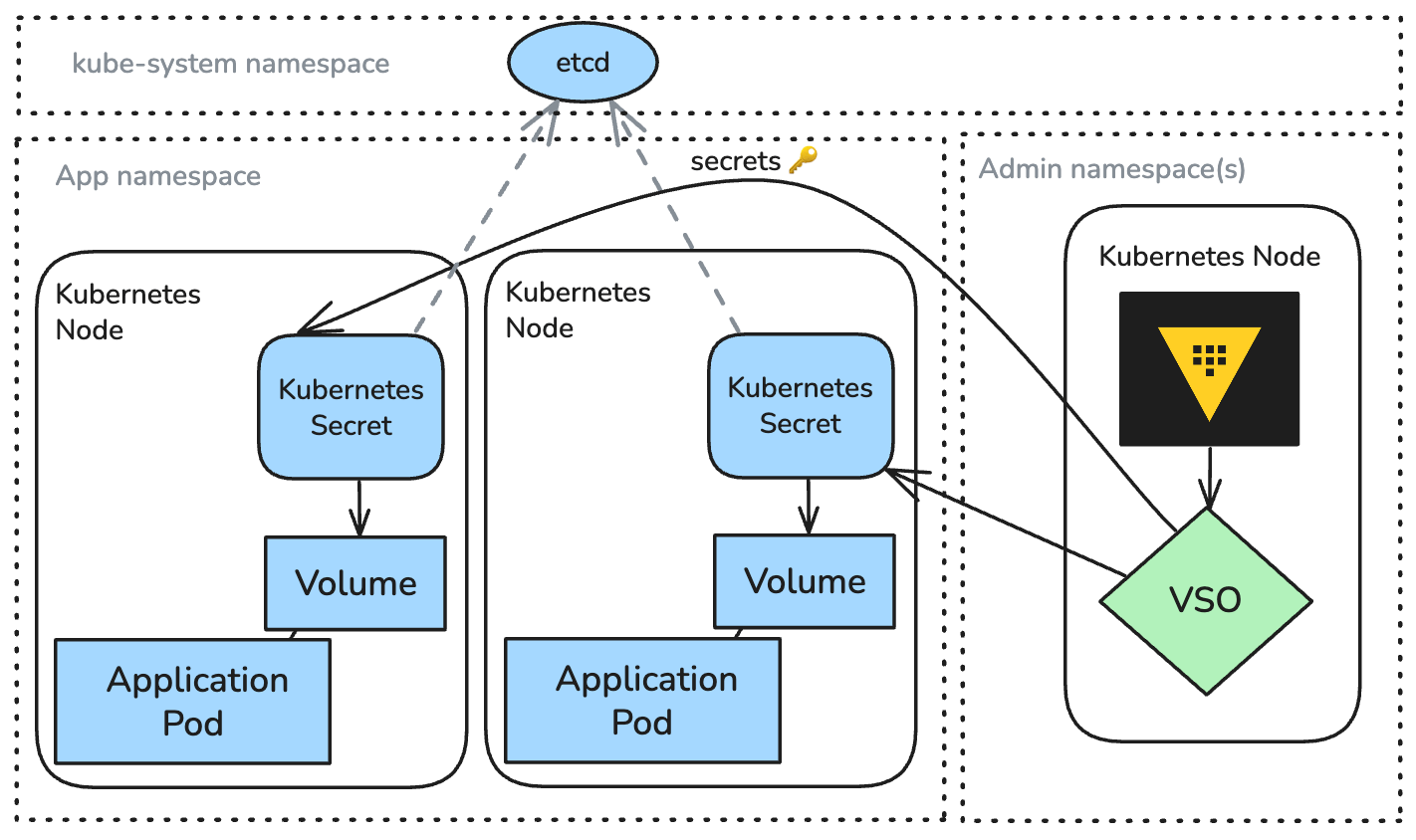
Platform teams managing Kubernetes often discover a massive security gap when scaling environments: securely managing secrets without slowing down development. Native Kubernetes Secrets lack enterprise-grade lifecycle management—generation, injection, rotation, and revocation across hybrid clouds. Enter the Vault Secrets Operator (VSO), a Kubernetes-native operator from HashiCorp that automates secret delivery from Vault into pods. VSO is now the recommended standard, replacing older patterns like the Vault agent sidecar injector. This guide demystifies VSO's integration with Kubernetes or OpenShift, covering prerequisites, step-by-step setup, and common pitfalls.
Prerequisites
- A running Kubernetes cluster (version 1.21+) or Red Hat OpenShift cluster
- HashiCorp Vault instance (OSS or Enterprise) accessible from the cluster
- kubectl or oc CLI configured to connect to the cluster
- Vault CLI installed for Vault authentication setup
- Basic understanding of Kubernetes resources (Pods, Deployments, Namespaces)
- Access to a Vault token or Kubernetes auth method configuration
Step-by-Step Instructions
1. Install the Vault Secrets Operator
The easiest way to install VSO is via Helm. Add the HashiCorp repository and deploy:
helm repo add hashicorp https://helm.releases.hashicorp.com
helm repo update
kubectl create namespace vault-secrets-operator
helm install vault-secrets-operator hashicorp/vault-secrets-operator --namespace vault-secrets-operator
Verify the operator pods are running:
kubectl get pods -n vault-secrets-operator
2. Configure Vault Authentication
VSO needs to authenticate with Vault. The recommended method is Kubernetes auth (JWT). First, enable and configure Kubernetes auth in Vault:
vault auth enable kubernetes
vault write auth/kubernetes/config \
    kubernetes_host="https://$KUBERNETES_SERVICE_HOST:$KUBERNETES_SERVICE_PORT" \
    token_reviewer_jwt="$(cat /var/run/secrets/kubernetes.io/serviceaccount/token)" \
    kubernetes_ca_cert=@/var/run/secrets/kubernetes.io/serviceaccount/ca.crt \
    issuer="https://kubernetes.default.svc.cluster.local"
Then create a role in Vault that maps a Kubernetes service account to Vault policies. For example:
vault write auth/kubernetes/role/my-role \
    bound_service_account_names=vso-app-sa \
    bound_service_account_namespaces=app-namespace \
    policies=my-policy \
    ttl=1h
3. Create a VaultConnection Resource
VSO uses custom resources to define the Vault connection. Create a YAML file (e.g., vault-connection.yaml):
apiVersion: secrets.hashicorp.com/v1beta1
kind: VaultConnection
metadata:
  name: vault-connection
  namespace: app-namespace
spec:
  address: "https://vault.example.com:8200"
  skipTLSVerify: false
  caCertSecretRef: "vault-ca-cert" # optional secret containing CA bundle
  headers: []
Apply it:
kubectl apply -f vault-connection.yaml
4. Create a VaultAuth Resource
Define how VSO authenticates to Vault using the Kubernetes auth method. Create vault-auth.yaml:
apiVersion: secrets.hashicorp.com/v1beta1
kind: VaultAuth
metadata:
  name: vault-auth
  namespace: app-namespace
spec:
  vaultConnectionRef: vault-connection
  method: kubernetes
  mount: kubernetes
  kubernetes:
    role: my-role
    serviceAccount: vso-app-sa
    tokenExpirationSeconds: 3600
Apply:
kubectl apply -f vault-auth.yaml
5. Create a VaultSecret Resource
Specify which secret(s) VSO should fetch from Vault. Example for a static secret:
apiVersion: secrets.hashicorp.com/v1beta1
kind: VaultSecret
metadata:
  name: app-secret
  namespace: app-namespace
spec:
  vaultAuthRef: vault-auth
  namespace: "admin" # Vault namespace (if using Enterprise)
  destination:
    name: my-app-secret
    create: true
  refreshAfter: 60s
  secretType: kv-v2
  vaultAddress: "https://vault.example.com:8200"
  path: "secret/data/app"
  type: Opaque
Apply:
kubectl apply -f vaultsecret.yaml
Now a Kubernetes Secret named my-app-secret is created in the same namespace, populated with values from Vault.
6. Use the Secret in Your Pod
Reference the generated Kubernetes Secret as usual in your pod spec:
apiVersion: v1
kind: Pod
metadata:
  name: app-pod
  namespace: app-namespace
spec:
  containers:
  - name: app
    image: my-app:latest
    env:
    - name: DB_PASSWORD
      valueFrom:
        secretKeyRef:
          name: my-app-secret
          key: password
Apply the pod. VSO automatically keeps the secret in sync with Vault—any rotation in Vault triggers an update to the Kubernetes Secret.
7. Advanced: Dynamic Secrets & Rotation
VSO also supports dynamic secrets (e.g., database credentials). Create a VaultSecret with type: dynamic and appropriate path. For rotation, VSO can update the Kubernetes Secret and optionally annotate pods for restarts using the vso-secrets-rotation annotation. See the official documentation for details.
Common Mistakes
- Incorrect Vault Auth Role Binding: Ensure the service account name and namespace in the
VaultAuthresource match exactly those bound in Vault's Kubernetes auth role. - Missing Vault Policies: The role must be associated with a Vault policy granting read access to the secret path. Otherwise, VSO receives permission denied errors.
- Wrong VaultConnection Address: The Vault address must be reachable from the cluster. Use internal DNS or a headless service if Vault runs inside the cluster.
- Not Setting
refreshAfter: Without this, VSO fetches the secret once and never refreshes. For auto-rotation, set a reasonable interval. - Overwriting Secrets Manually: Do not edit Kubernetes Secrets managed by VSO—changes will be overwritten. Update the source in Vault instead.
- Skipping TLS Verification in Production: Avoid setting
skipTLSVerify: truein production; always use proper certificates.
Summary
Vault Secrets Operator provides a declarative, Kubernetes-native approach to inject and manage secrets from Vault into pods. By installing VSO, configuring Vault authentication, and defining custom resources (VaultConnection, VaultAuth, VaultSecret), you gain automated lifecycle management—including rotation—without complex sidecars or CSI drivers. This guide walked through the essential steps and common pitfalls, enabling you to adopt VSO as the modern standard for enterprise secret management on Kubernetes and OpenShift. For further details, consult the official VSO documentation.
Related Articles
- 10 Critical Insights on Hypersonic Supply Chain Attacks and How to Survive Them
- The Path to Becoming a Cybersecurity Consultant: Skills, Certifications, and Trends
- How to Respond to a Cyberattack on Your Online Learning Platform During Finals
- Cisco Acquires Astrix Security: Q&A on AI Agent Security and Governance
- Python Unplugged PyTV Conference: Key Insights and Takeaways
- Week 19 Cybersecurity Highlights: Court Victories and a New Worm Threat
- A Proactive Approach: How Cloudflare Handled the Copy Fail Linux Vulnerability
- ‘Scattered Spider’ Leader ‘Tylerb’ Admits Guilt in Cryptocurrency Heist